

Have questions about paid ads, campaign optimisation, or platform features? Browse our knowledge base for step-by-step guides, FAQs, and expert insights to help you succeed.
When a Subscription Payment Fails
On This Page
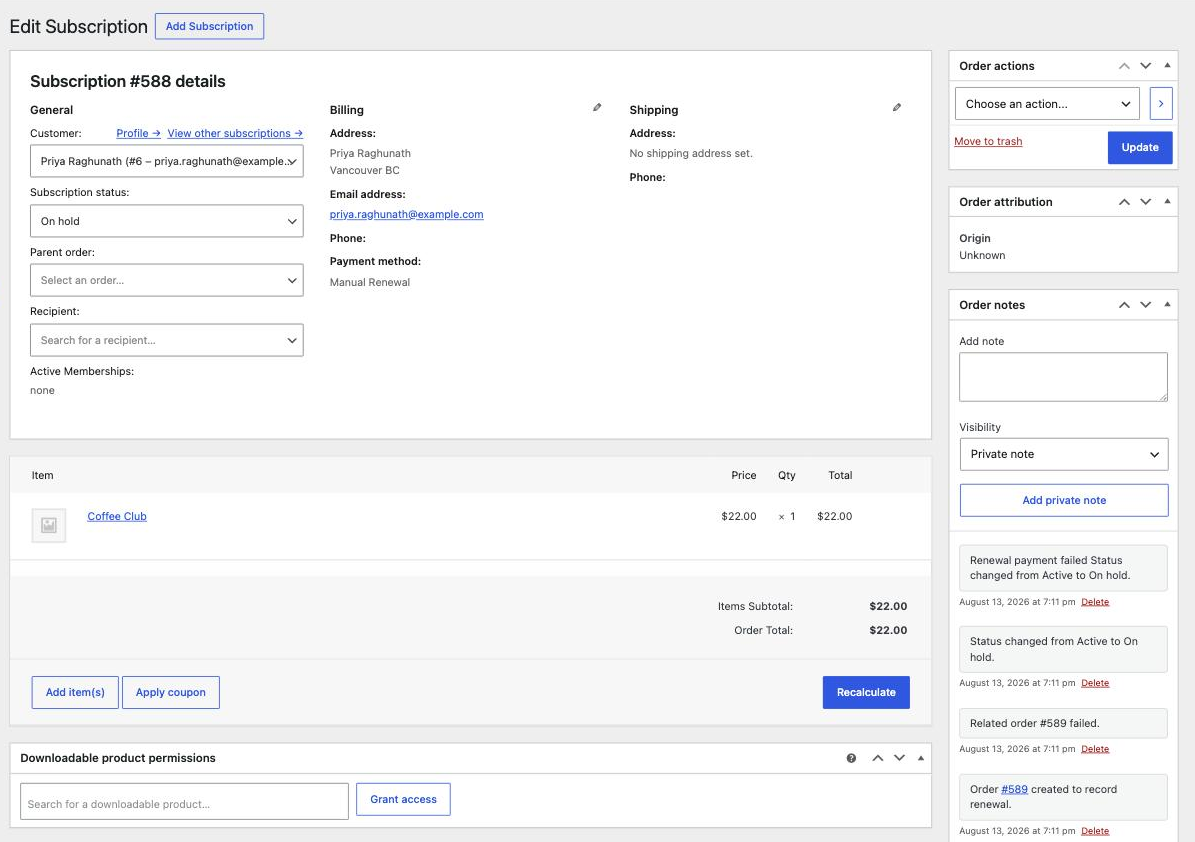
When a renewal payment does not go through, the site does three things on its own: it puts the subscription On hold, it creates a renewal order marked Failed, and it emails the customer. Nothing is broken and nothing has been lost. What is needed is a working card, which is the customer’s side of the job, not yours.
Do not cancel it. A failed payment is not a cancellation. If you cancel, you throw away the arrangement and the customer has to start again from scratch, usually after they have already fixed their card. On hold is the correct resting state until the payment succeeds.
Why it happens
Almost always something at the customer’s bank rather than anything on your site: an expired card, a replaced card after a loss or fraud, insufficient funds, or the bank declining a recurring charge it does not recognise. You will not be told which, because card networks deliberately do not say.
What you will see
- The subscription appears under On hold in WooCommerce, then Subscriptions.
- Open it. The order notes panel on the right records exactly what happened and when.
- Under Related Orders there is a renewal order with the status Failed. That is the attempted charge.
What to do
- Give it a day or two first if the failure is fresh. Many sites retry automatically, and many customers get the email and fix it themselves without you doing anything. Chasing within the hour usually just crosses in the post.
- If it is still on hold, email the customer. Tell them the card was declined and ask them to update it. Point them at changing the card your subscription is billed to, which walks them through it.
- Once they pay, it fixes itself. Paying the failed renewal order returns the subscription to Active and the next payment date carries on as normal. You do not need to change the status by hand.
Do not mark the failed order as Completed to tidy it up. That records a payment that never arrived. Your revenue reports will then be wrong, and you will have no record that anything went wrong. Leave it Failed. A failed order is information, not mess.
If it keeps failing
- Same customer, repeatedly. Their card is genuinely dead. They need to add a new one rather than retry the old one.
- Several customers at once, suddenly. That is not a coincidence and it is probably not their banks. Tell us straight away, because something on the payment side may have stopped working.
- The customer insists they were charged. Possible: the charge can succeed at the bank while the confirmation back to the site fails. Do not take a second payment. Send us the subscription number and the date and we will check the gateway.
When to email us instead
- More than one or two failures on the same day.
- Anything where the customer says money left their account.
- A subscription stuck On hold after the customer has paid.
What we need if something fails
The subscription number, the failed order number, the customer’s email, and whether they have tried updating their card yet.
Related
Still haven’t found what you’re looking for?
Let us know and we’ll do our best to help out!