

Have questions about paid ads, campaign optimisation, or platform features? Browse our knowledge base for step-by-step guides, FAQs, and expert insights to help you succeed.
Refunding a Subscription Payment
On This Page
Refunds happen on the order, never on the subscription. A subscription is the standing arrangement; each payment it takes is a separate order, and that order is where the money is. So the job is: find the right order, refund it, and then decide separately whether the subscription should also stop.
Refunding does not cancel anything. Give somebody their money back and the subscription happily bills them again next month. These are two jobs and it is easy to do one and forget the other, which is the single most common way a refund turns into a complaint. See cancelling a subscription.
Find the right order
- Open the subscription. See finding a customer’s subscription.
- Scroll to Related Orders. Every payment it has taken is listed, with dates and amounts.
- Pick the one matching the charge the customer is asking about, and open it. If they gave you a date or an amount, match on that rather than guessing at the most recent.
Refunding it
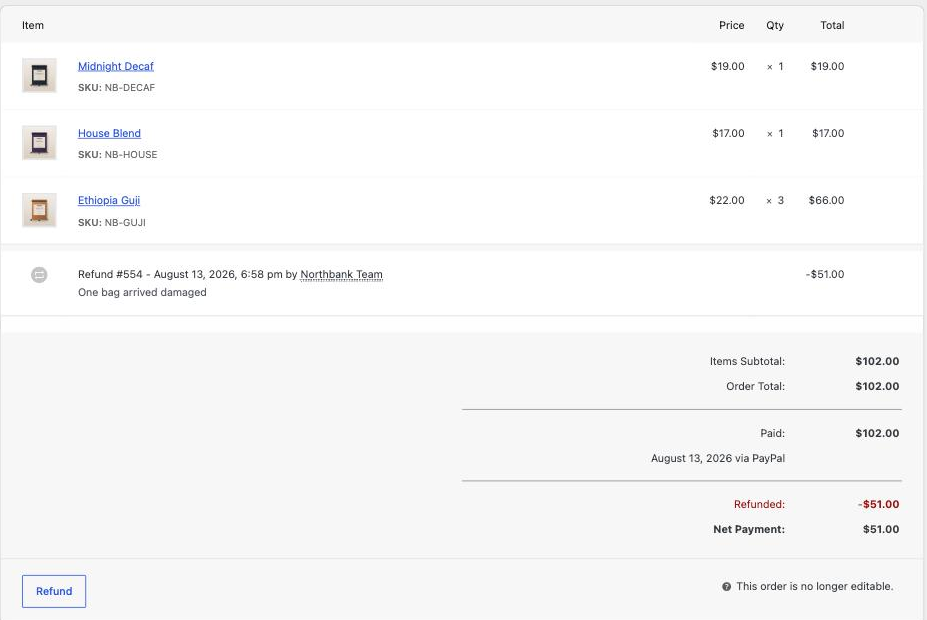
- On the order, scroll to the items and click Refund.
- Enter the amount. You can refund the whole thing or part of it. Partial is normal, for example one month of an annual plan.
- Add a reason. Write it for somebody reading it in a year, not for yourself today.
- Choose how to send it back:
- Refund via the card processor actually returns the money to the customer’s card. This is almost always what you want.
- Refund manually only records that a refund happened, and moves no money. Use it when you have already paid them another way, such as by e-transfer.
- Confirm. The order shows the refund against it, and your reports account for it automatically.
Refund manually does not send any money. Choosing it because it sounds safer is the mistake to avoid: the customer waits, nothing arrives, and your records say they were refunded. If you want the money to go back to their card, use the card processor option.
Then decide about the subscription
Ask what the refund was for:
- They are leaving. Refund, then set the subscription to Cancelled so it stops immediately. Pending cancellation is wrong here, because you have given the money back for the period they would otherwise keep.
- A one-off goodwill gesture and they are staying. Refund only. Leave the subscription alone.
- They were charged twice. Refund the duplicate order, leave the subscription active, and tell us, because a double charge usually means something needs looking at rather than just correcting.
What refunds do to your numbers
Analytics subtracts refunds from the period the original order was in, not the period you issued the refund. So refunding a January payment in August reduces January’s revenue. That is correct accounting and it is worth knowing before you wonder why a closed month changed. See WooCommerce Analytics.
What you cannot undo
A refund sent to a card cannot be reversed from your side. If you refund the wrong order or the wrong amount, tell us immediately rather than issuing a second transaction to compensate, because two wrong entries are much harder to unpick than one.
When to email us instead
- Any refund over an amount you would want a second pair of eyes on. You decide the number; the point is to have one.
- A refund on a payment taken by a method the site no longer uses.
- Anything a customer has already disputed with their bank. Do not also refund it, or you can end up paying twice.
What we need if something fails
The order number, the amount, the date, and whether you chose the card processor or the manual option.
Related
Still haven’t found what you’re looking for?
Let us know and we’ll do our best to help out!