

The Q4 Playbook Just Changed: 4 Shifts to Act On B…
The major platforms rolled out some of their biggest changes of the year right before the busiest selling season. Here’s what changed and what we’d…



Imagine a customer clicking your Google ad for “20% off” during Black Friday week, only to find it’s your end-of-summer sale that wrapped up in August. As of October 12, 2026, that’s a real possibility.
Google Ads now scans advertisers’ websites for discounts and deals and adds them to ads automatically. It’s switched on by default, and many advertisers only got about a week’s notice by email.
For some businesses, this is a helpful boost. For others, it can mean promoting expired offers, members-only codes or discounts with missing fine print, right in the middle of the busiest shopping season of the year.
Here’s what Google changed, who it affects, and how to check your account before the holiday rush.
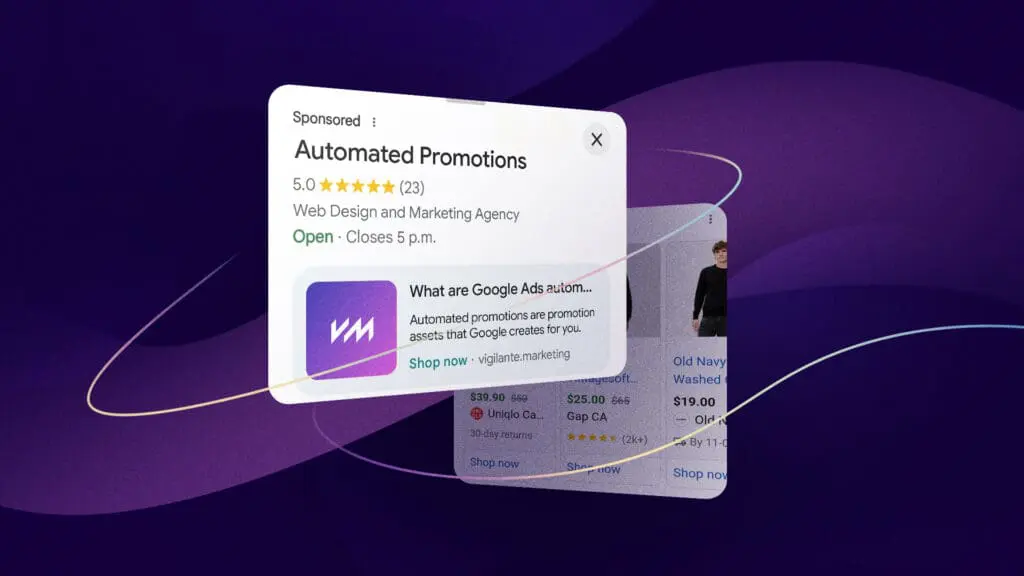
Automated promotions are promotion assets that Google creates for you. Google reads your landing pages, finds offers like “Buy one, get one free” or “15% off all services”, and shows them as an extra line or callout in your ads.
According to Google’s help page, each automated promotion runs for less than 24 hours at a time. Google then re-checks your website and only turns it back on if the offer is still visible there.
Your campaign is eligible if it is:
That means this mostly affects businesses with a physical location: retailers, restaurants, clinics, home services, dealerships and more. If you run Search or Performance Max campaigns with location assets, assume this is already on in your account.
Google says it only shows offers that are still live on your website. The catch: Google checks that the offer appears on your site, not that you still want to run it. That leaves a few gaps.
A summer sale banner, a forgotten pop-up or an old campaign landing page can all get picked up and shown in your ads.
“Minimum spend $100” or “selected items only” can get lost in a short ad line. Customers who click expecting a deal and don’t get it tend to leave.
Email subscriber codes, loyalty discounts and first-time customer deals can end up in front of every searcher, eating into your margins.
If Google pulls a different offer than the one you’re running for Black Friday, Cyber Monday or, for Canadian businesses, Boxing Day, your ads can send mixed messages during your most important weeks.
For regulated industries like finance, legal and healthcare, automated wording about pricing can create problems you didn’t sign off on.
None of this means the feature is bad. A retailer with one clear, current, sitewide sale may benefit from the extra visibility. The problem is that it’s on by default, and most businesses don’t know it’s there.
One catch: a promotion only appears here once it has started serving. If Google hasn’t shown it yet, you won’t see it in the list.
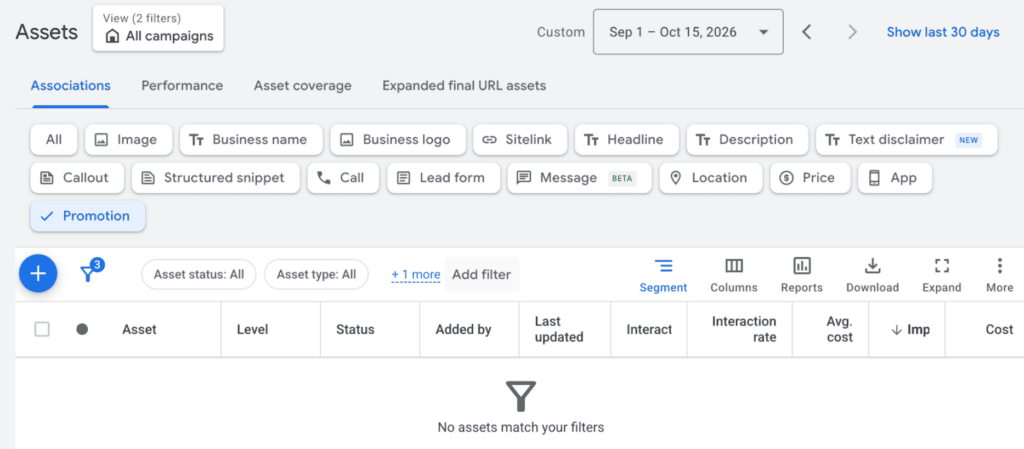
One catch: a promotion only appears here once it has started serving. If Google hasn’t shown it yet, you won’t see it in the list.
There’s no campaign-level switch. The workaround: add your own manual promotion asset to the campaign. Google skips any campaign that already has manual promotions running, so your offer shows instead of one it picked.
Google builds these promotions from your website, so the safest fix is to clean up the source. Whether you keep automated promotions on or not, run through this list before holiday traffic peaks. (For the bigger picture on Q4, see The Q4 Playbook Just Changed.)
Running an online store? The same audit applies whether you’re on WordPress or Shopify. (Here’s how the two compare.)
| Your Business | Our Take |
|---|---|
| One clear, current sitewide sale | Fine to leave on, but check what Google pulls |
| Several overlapping offers, multi-buys or member pricing | Turn it off and use manual promotions |
| Lead generation, B2B or service businesses | Turn it off; old intro pricing can resurface |
| Regulated industries (finance, legal, healthcare) | Turn it off |
If you want promotions in your ads this season, we recommend manual promotion assets with clear start and end dates. You control the wording, and Google won’t add its own.
If you leave it on, segment your campaign reports by click type to see how people interact with promotions, and compare conversions before and after October 12. Make sure your tracking is set up properly first. Our GA4 guide covers the basics.
No. Google Merchant Center has its own promotions feature for Shopping ads and free product listings. It’s a separate system with separate settings, so turning off automated promotions in Google Ads doesn’t change anything in Merchant Center, and vice versa. If you sell products online, check both.
Promotion assets that Google creates automatically by finding offers on your website and adding them to your Search and Performance Max ads.
October 12, 2026. Eligible accounts are opted in by default.
Active Search and Performance Max campaigns (including Local campaigns) that have location assets and don’t already have manual promotion assets.
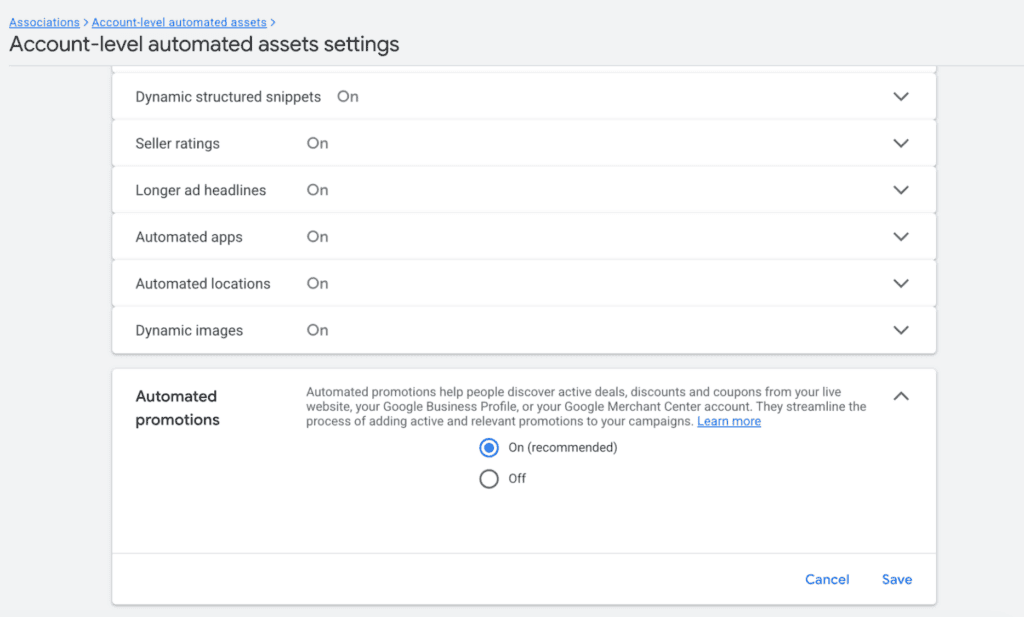
Go to Assets, click More, choose Account level automated assets, open Advanced settings and set Automated promotions to Off.
Not directly. Adding a manual promotion asset to a campaign stops Google from adding its own there.
No. Google skips campaigns that already have manual promotions running.
Google says it verifies offers are still active on your website before showing them. But if an old offer is still visible anywhere on your site, Google may treat it as current. That’s why the website audit matters.
Google doesn’t list a separate fee. You pay for clicks on your ads as usual.
Google hasn’t said it’s limited to certain countries, so Canadian advertisers should check their accounts too, especially with Boxing Day coming up.
No. Merchant Center promotions are a separate feature with separate settings.
This is one more example of Google automating more of your advertising, a trend we covered in our Google Marketing Live 2026 recap. Automation can help, but only when someone is watching what it does.
Our Google Ads management team reviews automated settings like this one as part of every account we manage, so your ads say exactly what you want them to.
Want us to take a look before Black Friday? Book a free strategy call and we’ll check your automated promotions, assets and holiday campaigns.



The latest marketing news, promotions, and tips & tricks in our monthly newsletter
"*" indicates required fields