

Have questions about paid ads, campaign optimisation, or platform features? Browse our knowledge base for step-by-step guides, FAQs, and expert insights to help you succeed.
Membership Plans Explained
On This Page
A plan is the rule, not the person. It decides what a membership unlocks, how long it lasts, and what causes somebody to get one. Members are attached to a plan, which is why changing a plan changes things for everybody holding it at once.
Where plans live
Go to WooCommerce, then Memberships, then Membership Plans. Most sites have only a handful, and they change rarely.
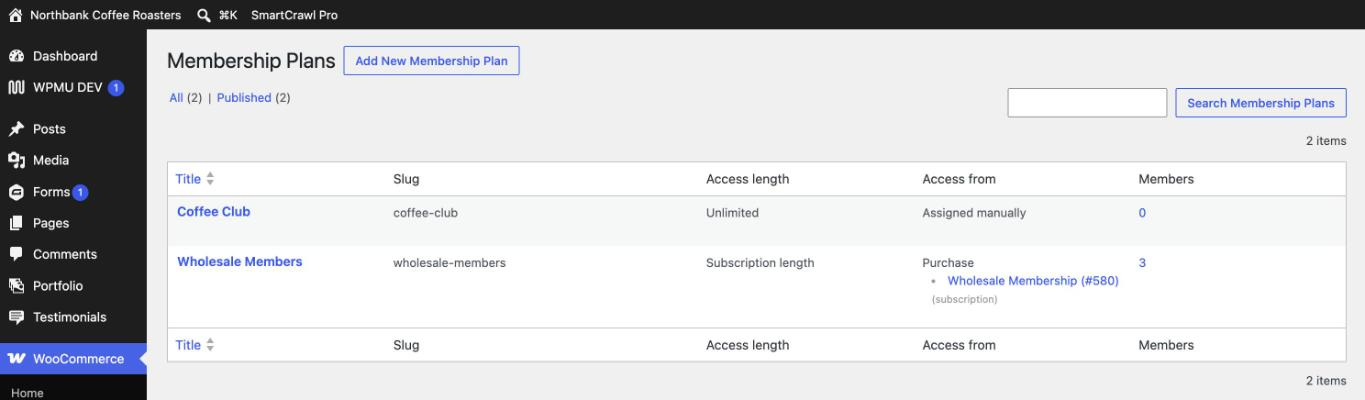
What a plan controls
| Setting | What it decides |
|---|---|
| How it is granted | Whether buying a particular product gives someone the plan automatically, or whether it can only be given by hand. |
| Access length | How long a membership lasts once it starts. A fixed length such as one year, or unlimited until somebody ends it. |
| Content restrictions | Which pages, posts and categories the plan unlocks. |
| Product restrictions | Which products members can see or buy, and any member pricing. |
| Members Area | What the member sees in their own account when they log in. |
Granted by purchase, or by hand
This is the setting worth understanding, because it explains most of the surprises.
- Granted by purchase. The plan is tied to one or more products. Buy the product, get the membership, automatically. This is how most paid memberships work.
- Manual only. Nothing on the site ever grants it. Somebody in your team adds each member deliberately. This suits honorary members, board members, comped accounts and anything you want to keep tight control of.
If members are appearing on a plan and you did not add them, it is granted by purchase and somebody is buying the linked product. If nobody is ever getting a plan automatically no matter what they buy, it is almost certainly set to manual only.
Reading a plan is completely safe. Opening a plan and looking through its tabs changes nothing. It is worth doing once for each plan you have, just so you know what your own site is set up to do.
Changing a plan affects everyone on it
This is the one thing to hold on to. A plan is not a template that members took a copy of when they joined. It is a live rule they are all pointed at. Add a content restriction and every member is affected the moment you save. Change the access length and it applies to memberships created from then on.
Tell us before you retire or rename a plan. Removing a plan, or unlinking the product that grants it, can quietly strip access from every member holding it, and the members themselves are usually the ones who discover it. Editing the description or the members area text is safe. Changing how a plan is granted, or deleting one, is worth a quick email first.
Adding a new plan
Creating a plan is genuinely easy, and getting it wired to the right product, with the right length and the right restrictions, is the part that needs care. If you need a new membership tier, tell us what it should include, what it costs and how long it should run, and we will set it up and test that it actually grants correctly before anybody buys one.
The reason we would rather do it is that a plan that looks right in the admin can still fail to grant, and the way you find out is a paying member emailing to say they cannot get in.
A quick way to check a plan is doing what you think
- Open the plan and note how it is granted and its access length.
- Go to the Members list and filter to that plan.
- Look at a couple of recent members and check their end dates match the length you expected.
If those dates do not look right, the plan and the reality have drifted apart, which is worth telling us about.
Related
Still haven’t found what you’re looking for?
Let us know and we’ll do our best to help out!