

Have questions about paid ads, campaign optimisation, or platform features? Browse our knowledge base for step-by-step guides, FAQs, and expert insights to help you succeed.
Writing a good excerpt
On This Page
The excerpt is the short summary shown instead of your post in a list: on your blog page, in a related-posts row, sometimes in a newsletter. If you leave it empty, WordPress takes the opening of the post and cuts it off mid-sentence. That default is fine surprisingly often, which is why this is a small job rather than a required one.
Write one when your first paragraph is a bad advertisement for the post. That is the whole decision. If your opening line already says what the post is about, the automatic version does the job. If your post opens with a scene, a question or a bit of throat-clearing, the list will show that instead of the point, and it is worth thirty seconds to fix.
Turning the box on
The excerpt box is hidden by default, which is why most people never discover it exists.
- Open a post for editing.
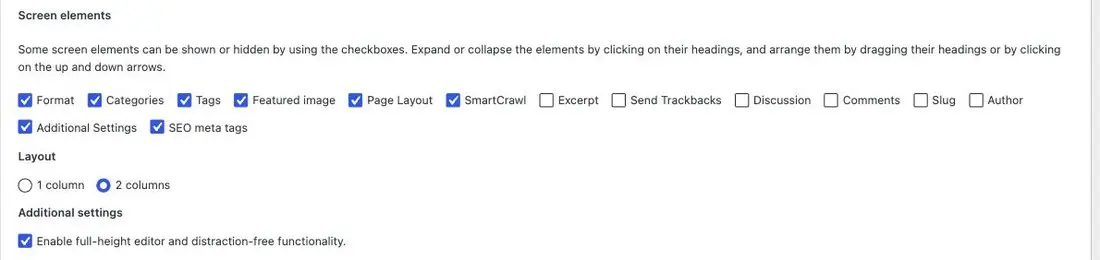
- Click Screen Options at the very top right of the screen.
- Tick Excerpt.
- The box appears below the main editing area. It stays on from now on, for every post.
What to write
One or two sentences, roughly 20 to 30 words, that tell somebody what they get if they click. Write it as a promise, not a teaser.
- Good: “Why your coffee tastes sour or bitter, and the one setting to change before you touch anything else.”
- Weak: “We look at some common brewing problems and offer a few thoughts.”
- Wrong job: “Click here to read more about coffee.” The link already says that.
Plain sentences. No formatting, no links, no images; most places that display an excerpt strip all of it out anyway.
The thing people get wrong
The excerpt is not the first paragraph of your post, and it should not be copied from it. If a reader sees the same sentence twice, once in the list and again at the top of the post, it reads like a mistake. Write the excerpt as a description of the post, from outside it.
The excerpt is not your search engine description. They look similar and they are stored separately. What Google shows under your link comes from the SEO settings further down the editing screen, which we usually manage for you. Writing a lovely excerpt does not change what appears in search results, and vice versa. If it is search results you care about, tell us and we will set the right field.
Where it actually shows up
This varies by site, which is worth knowing before you spend time on it. On most of the sites we build, the excerpt appears on the main blog listing and in related-post rows. It usually does not appear on the post itself. The fastest way to find out for your site is to write one, publish, and look at your blog page.
When to skip it entirely
Short posts where the opening line is already the summary. News items, event announcements, “we are closed on Monday”. The automatic version is not worse in those cases, and a habit you keep is better than a habit you resent.
What we need if something fails
The post address, and where you expected the excerpt to appear. If it is showing in a place you did not expect, or the automatic version is cutting off awkwardly, that is a layout question and we can adjust it.
Related
Still haven’t found what you’re looking for?
Let us know and we’ll do our best to help out!