

Have questions about paid ads, campaign optimisation, or platform features? Browse our knowledge base for step-by-step guides, FAQs, and expert insights to help you succeed.
Duplicating a page before you make big changes
On This Page
If you are about to make a big change to an important page, copy it first. The copy is a draft nobody can see, so you can rearrange it, break it, and start again without any of that touching the page your customers are looking at. When you are happy, we swap them over. This one habit prevents most of the “can you put it back how it was” emails we get.
Revisions cover small mistakes. This covers big ones. Undoing one wrong edit is what revisions are for. But if you spend an hour restructuring a page and then decide the old version was better, stepping back through twenty revisions is grim. A copy means the old version is simply still there, whole.
Making the copy
- Go to Pages in the left menu.
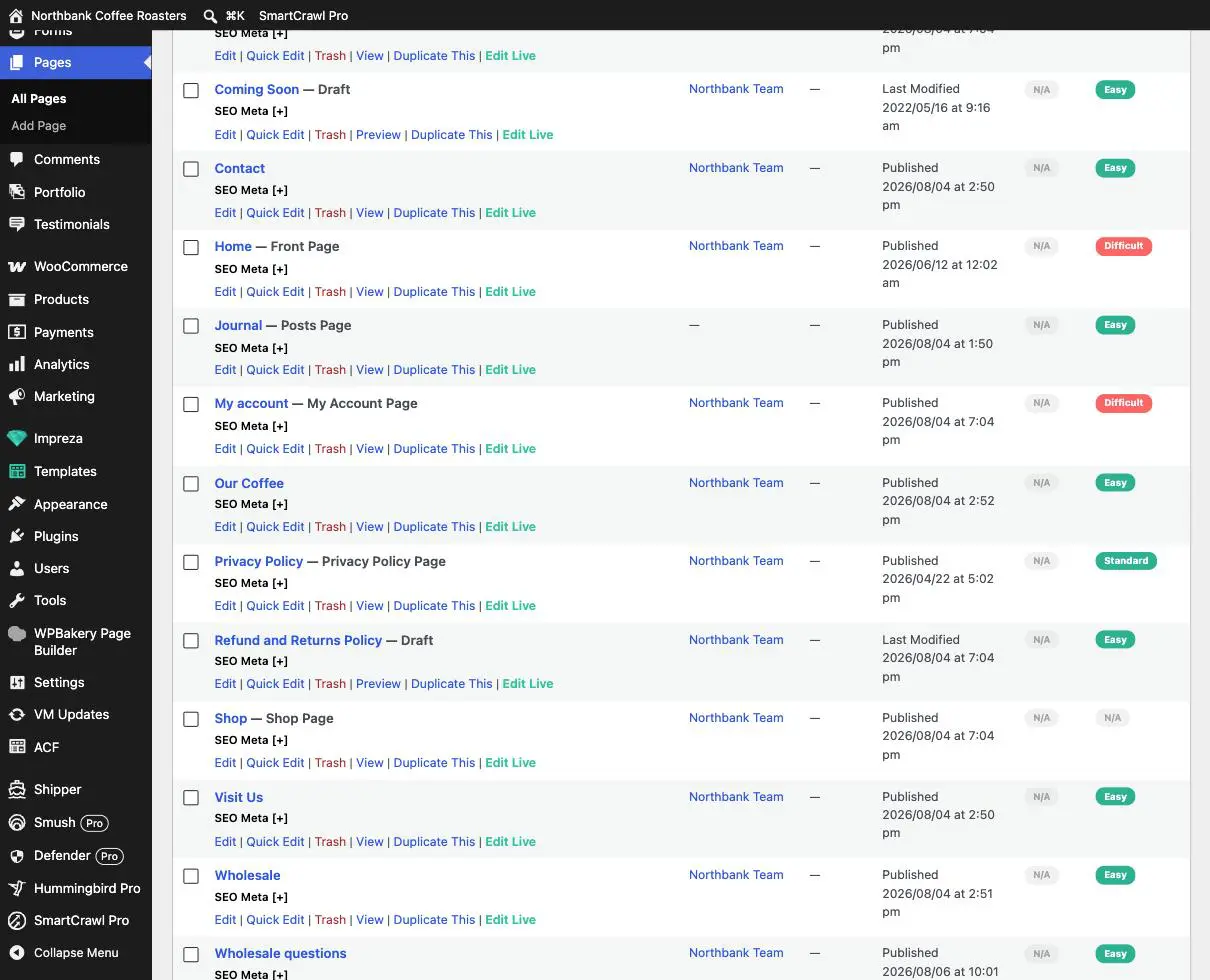
- Find your page in the list and hover over its name. A row of small links appears underneath.
- Click Duplicate This.
- A new draft appears in the list, named the same as the original. It is a draft, so no visitor can reach it.
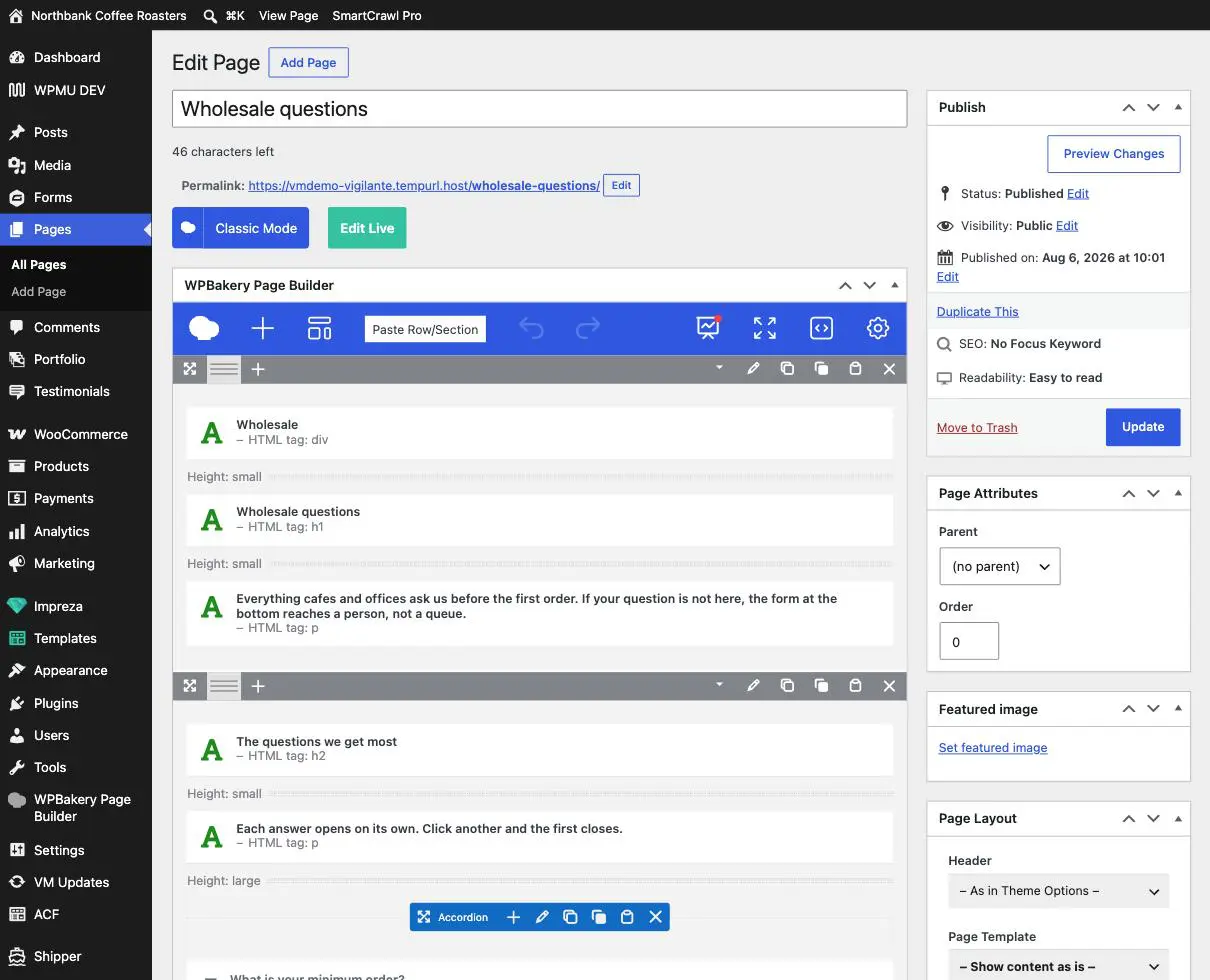
The same link is also in the sidebar while you are editing a page, which is handy when you are already in there and have just realised you should have copied it first.
Rename the copy straight away. Two pages called “About” in a list of thirty is how people end up editing the wrong one. Put a date on it: “About (working copy 6 Aug)”. You will thank yourself in a fortnight.
Working on the copy
- Open the copy and edit it as freely as you like. It is a draft, so nothing is public.
- Use Preview to see how it will look. Preview works on drafts, which is the whole point.
- Check it on your phone as well. Checking your changes on mobile covers how.
- Save as draft as you go. Do not click Publish. See the warning below.
Do not publish the copy yourself. Publishing it puts a second, nearly identical page on your live site at a slightly different address. Google then sees two pages competing for the same thing, which can cost you the ranking of the original, and customers can find the wrong one. When the copy is ready, email us and we will swap them so the good version takes over the original address and the old one is retired properly. It takes us five minutes and protects the address your links and search results point at.
When you are happy with it
Send us one line: which page, and that the copy is ready. We will move the new content onto the live page’s address, keep the address unchanged so nothing that links to it breaks, and keep the previous version recoverable for a while in case you change your mind.
When you decide against it
Trash the copy and carry on. The original was never touched, so there is nothing to undo. This is the good outcome as much as the other one is, because an hour spent on a version you rejected is an hour that cost you nothing.
When this is worth the two minutes
- Rewriting most of a page rather than fixing a sentence.
- Moving sections around, or deleting several.
- Anything on your busiest pages: the homepage, your main service page, anything you are running ads to.
- Any page you did not build and do not fully understand.
- A seasonal version you want ready in advance, so it can go live the moment you say.
Two things do not get copied. A duplicate is a copy of the page’s own content only. Anything shared, such as a reusable block, is still the same shared thing, so editing it on the copy also changes it everywhere else including the live page. And a form on the page keeps pointing at the same form, so a test submission on your draft lands in your real entries. Neither matters much once you know, but both surprise people.
When to email us instead
- You want the copy live at its own address rather than replacing the original.
- You need to copy a whole set of pages, or a page with a form or a booking flow on it.
- You do not see Duplicate This, which usually means the account you are signed in with does not have that permission.
- You have published a copy by accident. Tell us sooner rather than later, so it is out of Google’s index before it settles in.
Related guides
Still haven’t found what you’re looking for?
Let us know and we’ll do our best to help out!