

Have questions about paid ads, campaign optimisation, or platform features? Browse our knowledge base for step-by-step guides, FAQs, and expert insights to help you succeed.
Cancelling Your Subscription
On This Page
You can cancel your own subscription from your account on the website, without emailing anyone. The reason most people cannot find it is simple: the cancel button is not on the list of your subscriptions. It is one click further in, on the subscription itself. If you have already looked and given up, you were looking in a reasonable place. It just is not there.
The short version. Log in, go to Subscriptions, click View next to the one you want, and the Cancel button is in the Actions row near the top. Three clicks from the front page.
Step one: open your subscriptions
- Log in to your account on the website. The link is usually called My Account, Login or an account icon in the top corner.
- In the account menu, choose Subscriptions.
- You will see one row for each subscription, with its status, the next payment date and the amount.

Step two: open the subscription itself
Click View on the row you want to cancel. This is the step that is easy to miss, because the list looks like it should be where you act.
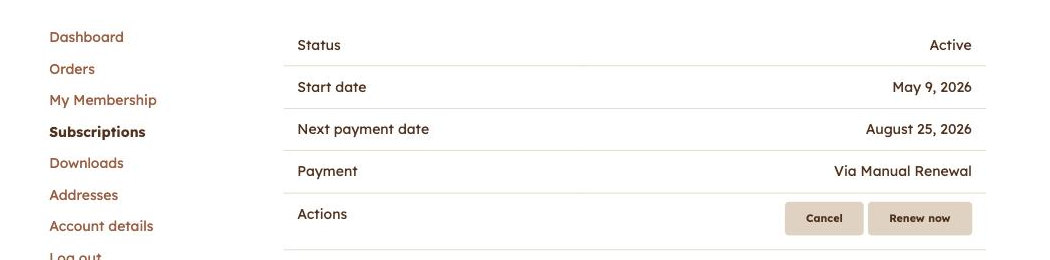
Step three: cancel
- Click Cancel.
- Confirm if you are asked to.
- The status changes straight away. You will usually get a confirmation email as well.
Cancelling does not always cut you off that day. If you have already paid for a period, most sites let you keep what you paid for until that period ends. The status will show as Pending cancellation until then, which means “still yours for now, will not renew, will not charge you again”. That is normally exactly what people want when they say they want to cancel.
If what you actually want is to stop the automatic renewal
These are two different things, and the difference matters:
- Turning off auto renew stops the next charge but leaves you subscribed until the period you paid for runs out. Some sites show an Auto renew switch on the subscription page. If yours does, and you simply do not want to be charged again, that switch is the gentler option.
- Cancelling ends the subscription.
If you are not sure which you want, ask yourself whether you would be annoyed to lose access tomorrow. If yes, turn off auto renew. If it makes no difference, cancel.
If the Cancel button is not there
- The subscription is already cancelled or expired. Check the status at the top of the page.
- It says Pending cancellation. You have already done it. Nothing further is needed and you will not be charged again.
- You are looking at the list, not the subscription. This is by far the most common cause. Click View first.
- There is genuinely no Cancel option on the subscription page. Some businesses turn self-cancellation off deliberately. In that case email them and ask, and they can do it in seconds at their end.
What to include if you do have to email
The email address on your account, and the subscription number shown at the top of the page. With those two things it takes them under a minute.
Related
Still haven’t found what you’re looking for?
Let us know and we’ll do our best to help out!