

Have questions about paid ads, campaign optimisation, or platform features? Browse our knowledge base for step-by-step guides, FAQs, and expert insights to help you succeed.
Finding Your Subscription in My Account
On This Page
Everything about your subscription lives in one place: your account on the website. From there you can see what you are paying, when the next payment comes out, and change or cancel it. You do not need to email anyone to look.
You already have an account. If you have ever paid for a subscription on the site, one was created for you at the time. If you have never set a password, use the Lost your password? link rather than signing up again, because a second account will not be able to see the first one’s subscription.
Getting in
- Go to the website and find My Account, Login, or a small person icon in the top corner.
- Log in with the email address you used when you subscribed. That detail matters: the subscription is attached to that address.
- Choose Subscriptions from the account menu.

What the list tells you
- Status. Active means running normally. On hold means paused, often because a payment did not go through. Pending cancellation means it will not renew but you still have it for now. Cancelled and Expired mean it has ended.
- Next payment. The date the next charge is due. If this is blank, nothing further is scheduled.
- Total. What you pay each time, and how often.
Seeing the detail
Click View on a row. This is where everything actually happens, and it is worth knowing that, because the list itself has no controls on it beyond that button.
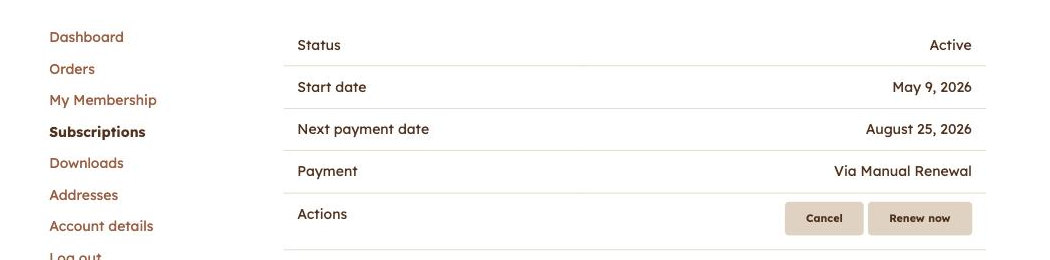
Depending on the site, the Actions row may offer:
- Cancel. See cancelling your subscription.
- Renew now, to pay early rather than wait for the date.
- Change payment method or Add payment, to update the card. See changing the card your subscription is billed to.
- An Auto renew switch on some sites, which stops future charges without ending the subscription.
If you cannot find it
- No Subscriptions item in the menu. You are probably logged in with a different email address than the one you subscribed with. Log out and try the other one.
- The list is empty. Same cause, or the subscription has already ended and been tidied away.
- You cannot log in at all. Use Lost your password? and check your junk folder for the reset email. Do not create a second account.
Related
Still haven’t found what you’re looking for?
Let us know and we’ll do our best to help out!