

Have questions about paid ads, campaign optimisation, or platform features? Browse our knowledge base for step-by-step guides, FAQs, and expert insights to help you succeed.
How to Create a TikTok Account
On This Page
TikTok accounts are created on a phone, not on a computer, and the account belongs to whoever’s phone number or email address is used to make it. That last part matters more than anything else on this page: set it up on a business email address, not a personal one, or the account leaves when the person does.
Use a business email address you will still control in three years. Something like [email protected] rather than a personal Gmail or one staff member’s work address. Recovering a TikTok account whose email nobody can access is genuinely difficult, and it is the single most common way businesses lose their own social accounts.
Steps
- Install TikTok from the App Store or Google Play, on a phone or tablet.
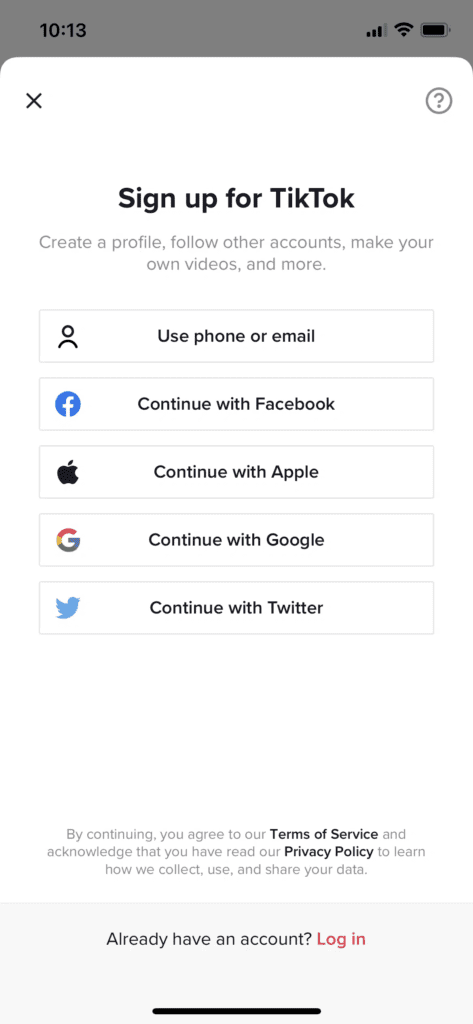
- Open the app and choose Use phone or email. Avoid the “continue with Facebook / Apple / Google” shortcuts for a business account; they tie the account to an individual’s personal login.
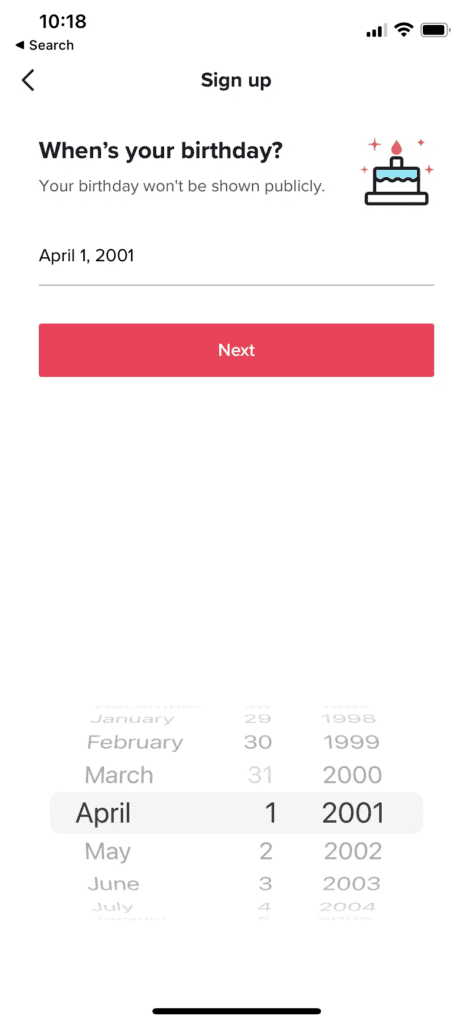
- Enter a date of birth. TikTok requires account holders to be at least 13 and applies further age-based restrictions to some features. Use the real date of birth of whoever holds the account.
- Enter the business email address and set a password. Save both somewhere the business keeps its credentials, not just in one person’s browser.
- Choose a username. Use the same handle as your other social accounts if it is available, so people can find you. You can change it later, but links people have shared will break when you do, so it is worth a minute’s thought now.
Finish the profile before you post
TikTok will prompt you to add a profile photo, a bio and a name. Do all three before your first video. An empty profile converts badly, and the bio is one of the few places on TikTok where you can put a link.
Under Edit profile you can also link your Instagram and YouTube accounts, which is worth doing if you are active on either.
You do not need a separate business account type to start. TikTok lets you switch a normal account to a Business Account later from the settings, which unlocks analytics and some scheduling. Get the account made and the profile filled in first; we will advise on switching when there is something to measure.
What we will need from you
Once it exists, tell us the handle. If we are producing video for you, we will also talk about how you want approvals to work before anything goes out. Video is the one channel where a post cannot be quietly edited after publishing, so the review step matters more than it does elsewhere.
If it does not go to plan
- The username is taken. Common. Add your city or a short word rather than a string of numbers, which reads as spam.
- No verification code arrives. Check the junk folder, then check the address you typed. If the email address belongs to a shared inbox, make sure somebody is actually watching it.
- You already have an account and cannot get in. Do not create a second one. Tell us and we will work out whether the first can be recovered, because two half-used accounts is worse than one dormant one.
What we need if something fails
Which step, and what the app said. Screenshots from the phone are genuinely useful here, more so than on desktop guides.
Related
Still haven’t found what you’re looking for?
Let us know and we’ll do our best to help out!