

Have questions about paid ads, campaign optimisation, or platform features? Browse our knowledge base for step-by-step guides, FAQs, and expert insights to help you succeed.
Making a field required, and editing validation messages
On This Page
A required field is one the form will not accept without an answer. When somebody leaves it blank, the form stops and shows a message next to it. That message is called a validation message, and you can write your own. The trade-off is simple and worth being deliberate about: every field you make required gets you more complete enquiries, and loses you a few people who could not or would not answer it.
A good rule of thumb. Require only what you genuinely cannot reply without, which is usually a name, a way to contact them, and the message itself. Everything else is a bonus. A form asking six compulsory questions gets noticeably fewer enquiries than one asking three.
Making a field required
- Go to Forms and click the form’s name.
- Click the field on the left. Its settings appear on the right.
- Under General, find Rules and tick Required.
- Click Save Form.
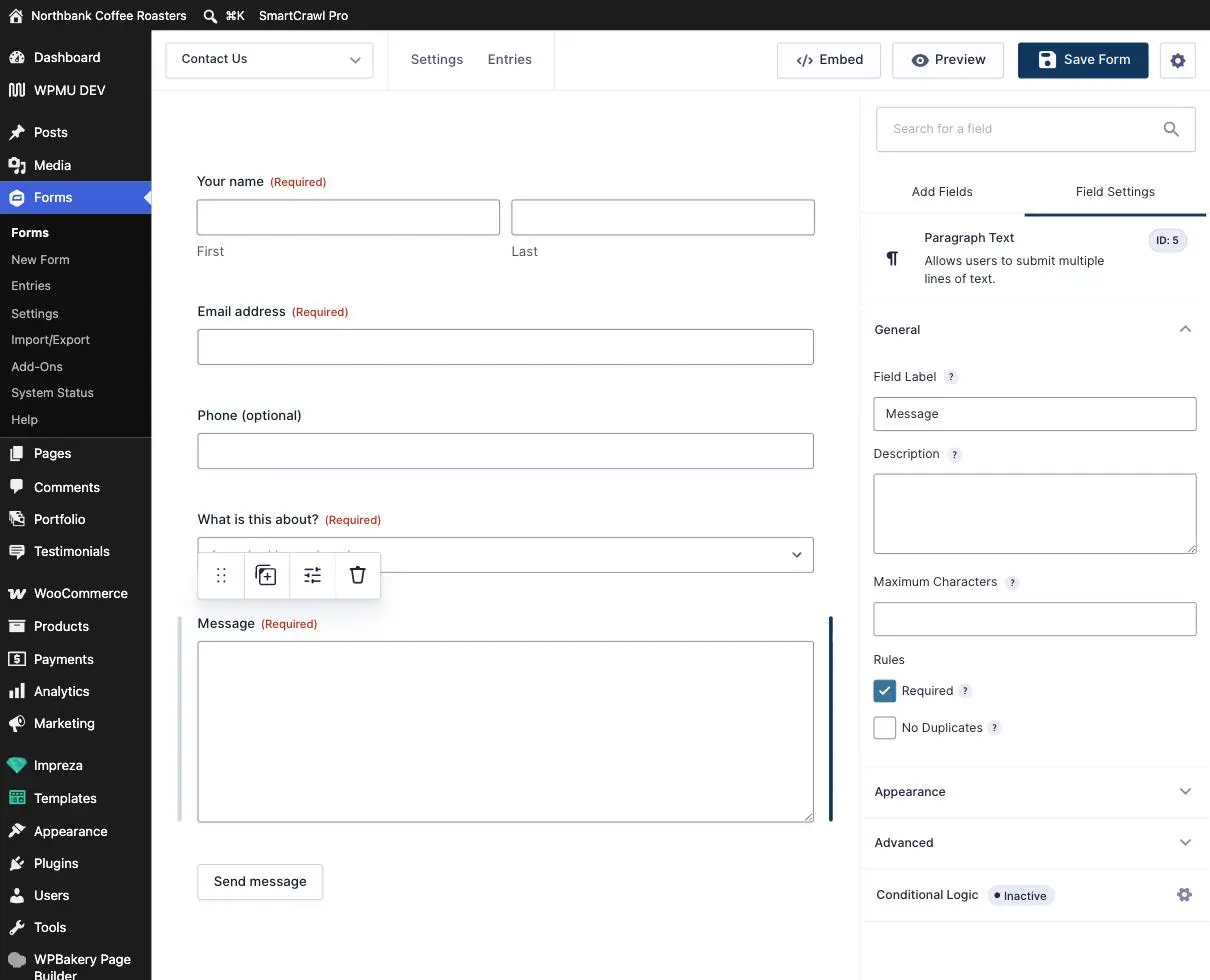
No Duplicates, just underneath, refuses an answer somebody else has already given. It is occasionally right for something like a competition entry per email address, and usually wrong for anything else, because a household sharing an email address or a customer enquiring twice both get blocked with no explanation.
Writing your own error message
The default message is fine but blunt. A better one tells the person what to do rather than what they did wrong.
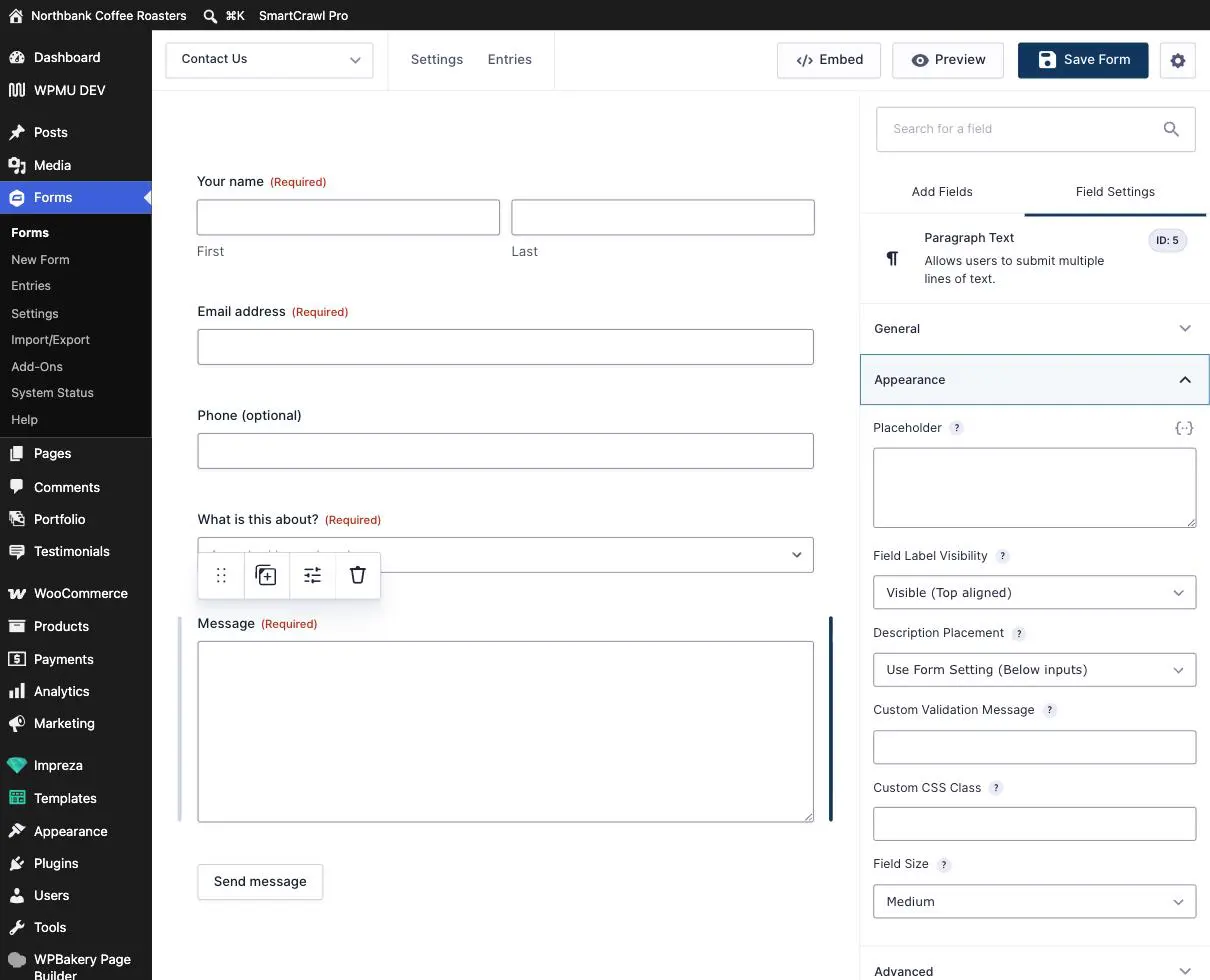
- With the field selected, open the Appearance section on the right.
- Type into Custom Validation Message.
- Click Save Form.
| Instead of | Try |
|---|---|
| “This field is required.” | “Please tell us your name so we know who we are replying to.” |
| “Please enter a valid email address.” | “That email address does not look right. Please check it, because it is how we will reply.” |
| “This field is required.” (on a phone field) |
“A phone number helps us sort this out faster. Digits only is fine.” |
Say why, not just what. “We need this to reply to you” turns an obstacle into a reason. It costs nothing and measurably fewer people abandon the form.
Placeholders, and why they are not labels
Placeholder, in the same Appearance section, is the grey hint inside an empty box. It is useful for showing a format, like a phone number example.
Never use a placeholder instead of a label. Placeholder text vanishes the moment somebody starts typing, so they lose track of which box they are in, and it is invisible to screen readers, so anybody using one has an unlabelled box. Keep the label and use the placeholder only for an example.
Test it, both ways
Changing what a form accepts is exactly the kind of change that can silently cost you enquiries, so test properly on the live site:
- Submit the form with the required field empty. Confirm it stops you and your message reads well.
- Submit it again properly filled in. Confirm it goes through.
- If you made a phone field required, try a realistic number with spaces or brackets in it. This is where forms most often reject perfectly good answers.
Do not make a hidden field required. If a field is hidden, or shown only by conditional logic, marking it required can make the form impossible to submit for some visitors. They see an error next to a box that is not on their screen, so there is nothing they can do. It produces the worst kind of fault: the form looks fine to you and is completely broken for a subset of real people. If a field is hidden for any reason, leave it optional and ask us.
The compromise worth considering
If you want a phone number but do not want to lose people who will not give one, leave it optional and put the reason in Description: “Optional, but it helps us reply faster.” You get most of the phone numbers and none of the abandonment.
When to email us instead
- You want a field required only sometimes, for example a phone number only for wholesale enquiries. That is conditional logic and worth having set up and tested properly.
- You need a specific format enforced, like a postcode or an order number pattern.
- Visitors are telling you the form rejects valid details. Send us the exact thing they typed if you can get it.
- Enquiries dropped noticeably after a change here. That is a real signal and we can usually see why quickly.
Related guides
Still haven’t found what you’re looking for?
Let us know and we’ll do our best to help out!