

Have questions about paid ads, campaign optimisation, or platform features? Browse our knowledge base for step-by-step guides, FAQs, and expert insights to help you succeed.
My form emails are not arriving: what to check first
On This Page
There are two completely separate questions here, and answering the first one takes fifteen seconds and tells you which problem you actually have. Is the form broken, or is only the email missing? Go to Forms and look at the entry count. If enquiries are arriving on the site, the form works perfectly and this is an email delivery problem. If nothing is arriving, it is a form problem. The fixes are entirely different, so start here rather than guessing.
The good news first. In the large majority of cases the enquiries are safe on your website and only the email went missing. Nothing has been lost, and you can read every enquiry right now under Forms then Entries while you sort the email out.
Step one: check the entries
- Go to Forms in the left menu.
- Look at the Entries number beside the form in question.
- Click it and check the dates at the top of the list.
If there are recent entries you never got emails about, go to the next section. If the list is genuinely empty for a period when you know people were writing in, skip to If nothing is arriving at all.
If the entries are there but the email is not
Work through these in order. The first two catch most cases.
1. Look in spam, and look properly
Search your whole mailbox for the form’s subject line rather than just glancing at the spam folder. On Gmail, search in:anywhere followed by a word from the subject. Website email very often lands in spam, and if you find it there, click Not spam and add the sender to your contacts, which usually stops it recurring.
2. Check who the notification is actually addressed to
Open Forms, your form, Settings, then Notifications, and click the notification. Read the Send To Email field carefully.
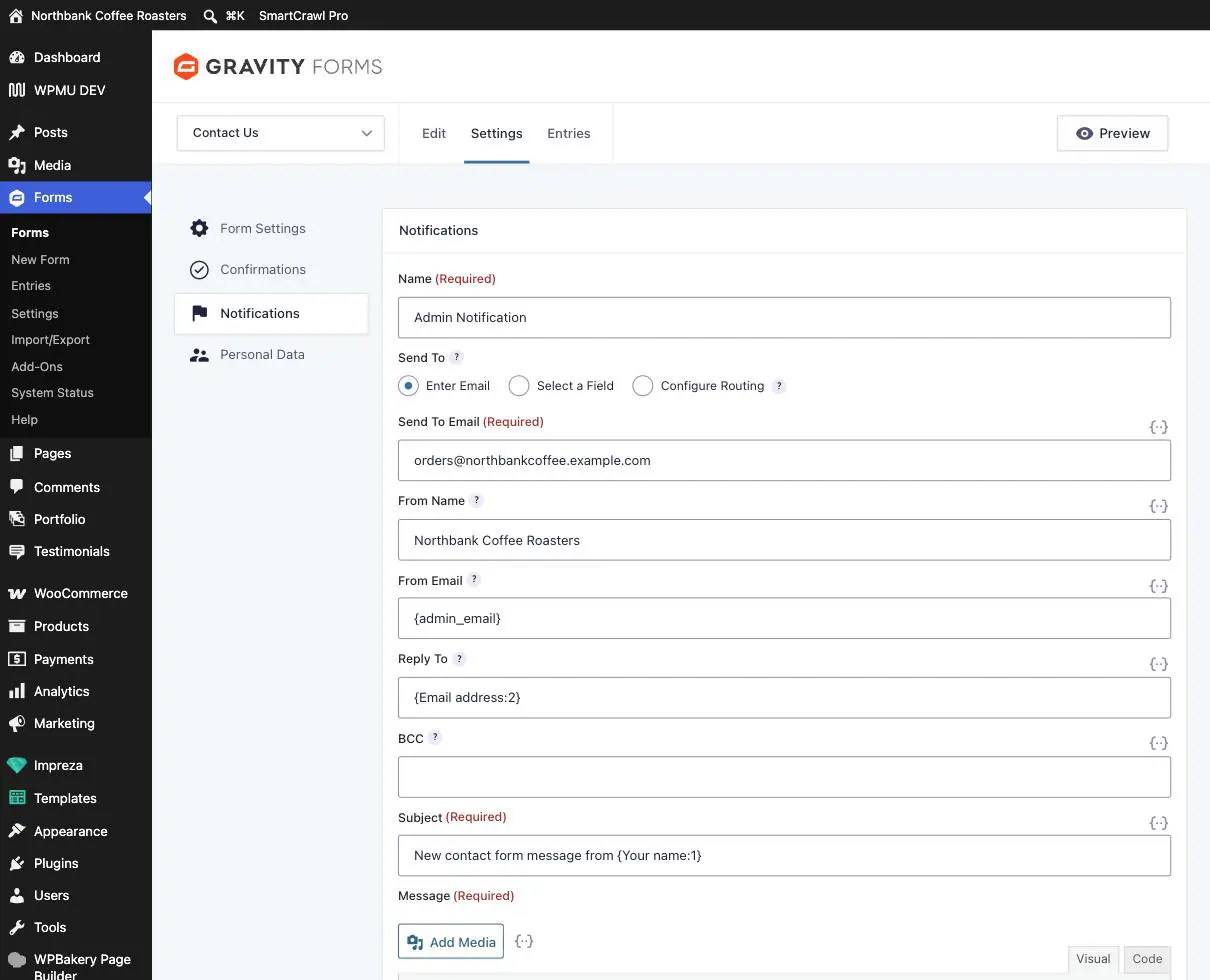
Things that turn up surprisingly often: a typo from a past edit, an address belonging to somebody who has left, a distribution list that has since been deleted, or a comma missing between two addresses so the whole thing is treated as one invalid recipient.
3. Check whether From Email has been changed
If From Email has been set to a Gmail, Outlook, Yahoo or Hotmail address, that is very likely your problem. Your website is not authorised to send email claiming to come from Gmail, so Google and Microsoft treat it as forged and either reject it or file it as spam. It should be your own domain, or the {admin_email} placeholder. If somebody has changed it, that is worth telling us about rather than fixing blind, because we can check the domain’s email settings at the same time.
4. Confirm the notification is switched on
On the notifications list, check for the green Active label. An inactive notification sends nothing at all, and it is easy to switch off by accident.
5. Resend one, as a test
Open a recent entry and use Resend in the Notifications panel on the right.
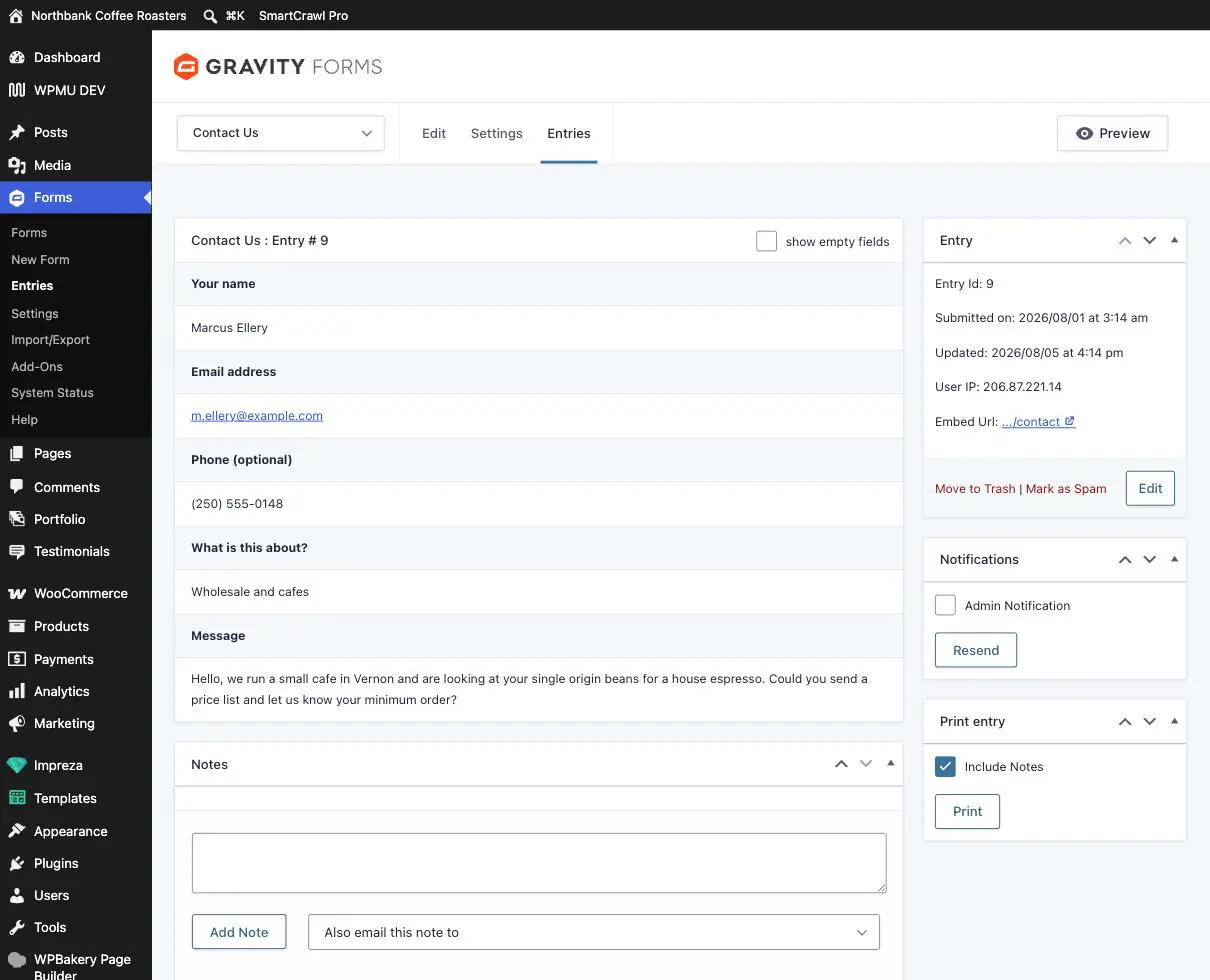
If the resend arrives, the settings are fine and something intermittent is going on, which is worth reporting. If it does not, tell us and include which entry number you tried.
If nothing is arriving at all
No new entries plus no emails means the form itself is not completing. Email us, and this is worth doing promptly, because every hour it stays broken is enquiries you never find out about. Before you do, two quick checks that help us:
- Fill the form in yourself on the live site, from your phone if you can, and note exactly what happens. Does it spin, show a red error, reload with the fields still full, or look like it worked?
- Note the page address you were on.
If a required field is failing validation, real visitors just give up. A form that rejects a perfectly normal phone number, for example, looks broken to the customer and they leave without telling you. This does not show up as an error anywhere, so the only way you find out is by trying the form yourself. Worth doing once a month on your main enquiry form.
What to send us
You never need to diagnose it. These four things get it fixed fastest:
- Which form, by name.
- Whether entries are arriving on the site or not. This is the big one.
- Roughly when it last worked.
- What you saw when you tried the form yourself.
Worth knowing
- Email that has always gone to spam is usually a domain settings job at our end rather than anything on this screen, and it is a permanent fix rather than a workaround.
- If one person at your company gets the emails and another never does, it is their mail filtering, not the form. The form sends one email to all recipients.
- Enquiries you can see under Entries are safe indefinitely. There is no rush to copy them out.
Related guides
Still haven’t found what you’re looking for?
Let us know and we’ll do our best to help out!