

Have questions about paid ads, campaign optimisation, or platform features? Browse our knowledge base for step-by-step guides, FAQs, and expert insights to help you succeed.
Managing Cloudflare account access
Follow these steps to add members to your account:
1. Log in to the Cloudflare dashboard.
2. Click the appropriate Cloudflare account where access will be shared. You should see the Home tab with a list of your sites.
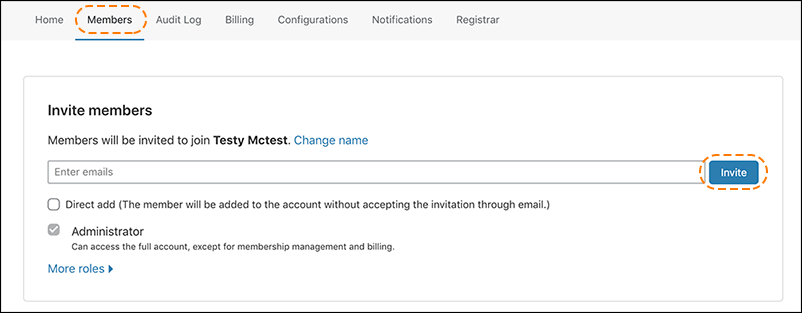
3. Click the Members tab located in the top navigation bar.
4. In the Invite Members panel, enter the email address requiring account access. You can enter additional email addresses. Ensure Cloudflare configurations for the subdomain are moved from the parent domain to the child subdomain before activating the child subdomain at Cloudflare. Refer to the best practices for adding child subdomains.
5. Click Invite.
6. The new members will receive an email invitation with a confirmation link.
Still haven’t found what you’re looking for?
Let us know and we’ll do our best to help out!